

Related Tools:
Key Highlights:
Home Loan Optimizer
| Month | Opening Balance (₹) | EMI (₹) | Interest (₹) | Principal (₹) | Closing Balance (₹) |
|---|
Description:
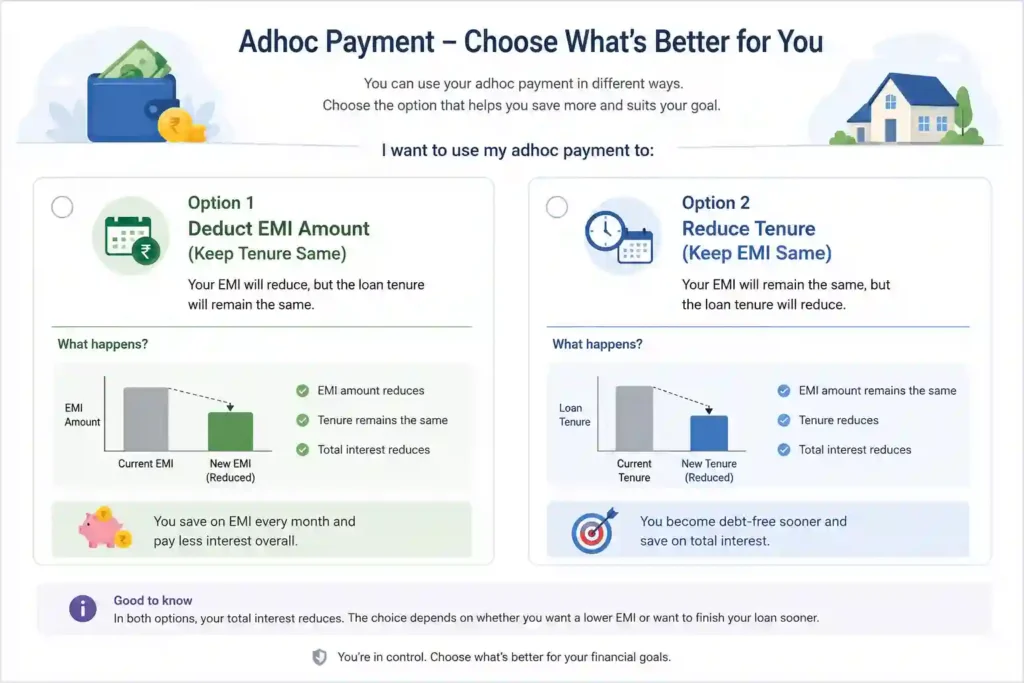
Take control of your home loan with our intelligent Payment Decision Calculator. This powerful tool helps homeowners analyze the impact of making an ad-hoc prepayment on their outstanding loan. Simply enter your remaining loan balance, tenure, interest rate, and proposed advance payment amount—the calculator instantly shows you two optimized scenarios: reducing your EMI while keeping the same tenure, or reducing the tenure while keeping your EMI unchanged.
The interactive amortization schedule displays month-by-month breakdowns for both options, and a donut chart visually compares total interest payable. A dynamic recommendation highlights which strategy saves you more money. All inputs support Indian comma-separated currency format (₹50,50,000) for local convenience. The clean, modern interface includes a date picker and FontAwesome icons. You can download the complete amortization schedule as a professionally formatted A4 PDF—perfect for financial planning or sharing with your bank. Make smarter loan decisions instantly, without page refreshes, and understand exactly how prepayment benefits your financial future. Optimize your home loan today with data-driven clarity.
How to Use This Calculator
Step 1: Enter Your Loan Details
Outstanding Principal – Enter your remaining loan balance (e.g., ₹25,00,000). Use Indian comma format or plain numbers.
Remaining Tenure – Input the number of months left on your loan (e.g., 120 months).
Interest Rate – Enter your annual interest rate (e.g., 8.5%).
Advance Payment – Specify how much extra you want to pay upfront (e.g., ₹2,00,000).
Payment Reference Date – Select a date using the calendar picker (format: 05-June-2025).
Step 2: Calculate & Compare
Click the “Calculate & Compare” button. The tool instantly displays two scenarios:
Option A – Keep same tenure, EMI reduces
Option B – Keep same EMI, tenure reduces
Each card shows new EMI, revised tenure, total interest, and total outflow.
Step 3: Analyze the Donut Chart & Recommendation
The donut chart visually compares total interest between both options. A smart recommendation highlights which strategy saves you more money.
Step 4: View Amortization Schedule
Click “View Option A Schedule” or “View Option B Schedule” to see month-by-month repayment breakdowns.
The table shows opening balance, EMI, interest, principal, and closing balance for each month.
Step 5: Download as PDF
Click the “Download Amortization (PDF)” button to export the current schedule as a clean, A4-formatted PDF for printing or sharing with your bank.
Frequently Asked Questions
This tool helps you decide whether it's better to reduce your EMI or reduce your loan tenure after making an ad-hoc (advance) payment on your home loan. It shows you the financial impact of both options, including total interest saved and revised payment schedules.
You need four key details: your outstanding loan balance, remaining tenure (in months), annual interest rate, and the advance payment amount you wish to make. You can also optionally select a reference date.
Option A (Reduce EMI) – Your loan tenure stays the same, but your monthly EMI decreases.
Option B (Reduce Tenure) – Your monthly EMI stays the same, but your loan gets paid off faster with a shorter tenure.
The calculator provides a smart recommendation based on total interest saved. Generally, reducing tenure saves more interest in the long run, but reducing EMI improves monthly cash flow. The choice depends on your financial goals.
The schedule uses standard loan amortization formulas with monthly compounding. It provides a highly accurate month-by-month breakdown of principal, interest, and outstanding balance after your prepayment.
Yes! Click the "Download Amortization (PDF)" button to export the current schedule as a clean, A4-format PDF. It's perfect for record-keeping or sharing with your bank
Absolutely. All input and output fields support Indian comma-separated format (e.g., ₹50,50,000). You can enter numbers with or without commas.
No. The calculator uses AJAX to dynamically update results, charts, and schedules without any page refresh.
Yes. After calculation, you can toggle between Option A and Option B schedules using the buttons below the amortization table
No. All calculations are performed locally in your browser. Your loan data never leaves your device, ensuring complete privacy.
Disclaimer: The tools and calculators on SmallToolkit (https://smalltoolkit.com) are provided for general informational purposes only. Read more…. 226700